


Is This Calendar Money App Really Worth It?
If you like the idea of “seeing” your money day by day instead of wrestling with endless spreadsheets, CalendarBudget might already be on your radar. It’s a calendar-based budgeting tool that lets you map income, bills, and goals directly onto a monthly view so you can see your future bank balance before you spend.
Key Takeaways
| Question | Short Answer |
|---|---|
| What is CalendarBudget? | A calendar-based personal finance app (web + mobile) that lets you plan and forecast your cash flow on a visual calendar. Learn more on the official overview page. |
| How much does CalendarBudget cost in 2025? | Current plans list around $8.99/month or $64.99/year for memberships, with some in-app purchase variants going up to $89.99/year. See the latest details on the pricing page. |
| Is CalendarBudget good for beginners? | Yes. The calendar layout pairs well with beginner guides like the platform’s own budget planning for beginners tutorial, making it approachable if you’ve never budgeted before. |
| Can it help avoid common budgeting mistakes? | It’s designed to. Visual planning and reminders make it easier to dodge pitfalls described in their article on common budgeting mistakes. |
| Is CalendarBudget safe to connect to my bank? | The team outlines 256-bit SSL encryption and read-only bank connections on their security and privacy page, which is in line with modern standards. |
| Does it really help long-term savings? | The whole product is built around that idea, as they explain in their guide on using a budget calendar for long-term savings. |
| Where can I read real user stories? | You can skim long-term experiences and life-change stories on their dedicated testimonials page, plus related advice in the broader budget blog. |
Web, iOS, Android
~$8.99/mo or $64.99/yr
30‑day free trial
Calendar‑based money planning
- People who think in dates & due days, not categories
- Beginners who want to see “future balance” at a glance
- Families juggling bills, paychecks, and savings goals
- Users who like a simple, focused budgeting workflow
- People who want deep investing or net‑worth tracking
- Those who rely heavily on automatic category rules
- Power users needing business‑grade accounting
- Anyone unwilling to engage with a monthly planning view
Introduction & First Impressions
CalendarBudget positions itself very clearly: it’s a money calendar, not a sprawling all‑in‑one finance cockpit. Load it up, and the first thing you see is a familiar month grid with income, bills, and transfers plotted on the days they happen.
This instantly answers one of the biggest day‑to‑day questions people have: “If I pay this bill now, will my account survive until payday?” The app’s promise is that by forecasting your account balance ahead of time, you can stop guessing and start planning.
According to their own materials, CalendarBudget is aimed at everyday people—families, single professionals, and anyone who’s tired of wondering where the money went. It exists to fix a specific pain: cash‑flow anxiety caused by not seeing future balances clearly.
For this review format, we’re drawing on the latest public product information and 2025 documentation, rather than a live lab test. Individual user experiences may vary, so always confirm details like pricing inside the app.
2025 user sentiment snapshot (Needs verification): Public testimonials on the site describe CalendarBudget as a “lifesaver” and something people “use on a daily basis” to keep control of their finances, but these are self‑submitted and not independently audited.
Try Calendar-Based Budgeting With CalendarBudget
Want to see your money laid out on a calendar instead of buried in a spreadsheet? Test CalendarBudget risk‑free and decide for yourself.
We may earn a commission if you use this link, at no extra cost to you.
CalendarBudget Overview & Core Features
At its heart, CalendarBudget is a personal finance planner that uses a calendar interface instead of the usual list or chart view. You enter your paydays, bills, subscriptions, and savings transfers on the dates they occur, and the software automatically forecasts your running balance.
Unlike some apps that only track what already happened, CalendarBudget is heavily focused on the future. You can scroll weeks or months ahead to see when your balance might dip, when you can comfortably schedule a big payment, or how a new recurring expense will affect your cash flow.
Key capabilities called out on the site include:
- Day‑by‑day balance forecasts based on scheduled income and expenses
- Cross‑platform access via browser, iOS, and Android
- Optional bank connect and automatic import (USA & Canada)
- Reports to show spending patterns and progress
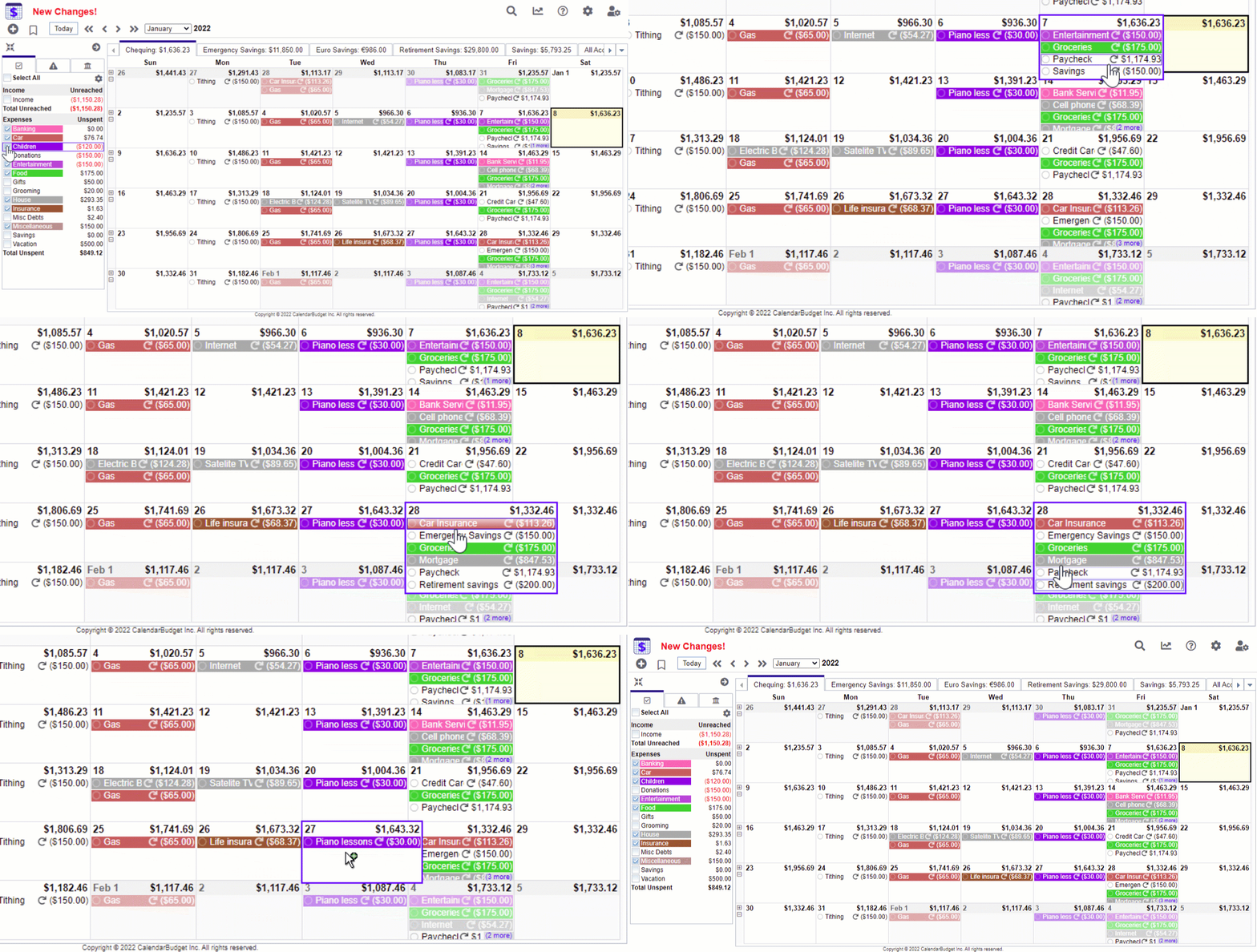

Design, UX & How CalendarBudget Feels to Use
The overall design is practical and unpretentious. The logo and branding are straightforward, and screenshots show a familiar calendar layout with colored entries for income, bills, and other transactions.
The web version behaves like a typical calendar app: click a day to add or edit an item; hover or tap to see details; browse forward to future months. Mobile versions on iOS and Android follow the same model, which makes switching between devices easy.
Cross‑Platform Experience
CalendarBudget promotes itself as “cross platform friendly,” and that matters if you plan on checking your budget on your phone during the day and updating it on a laptop at night. Web, Android, and iOS apps sync data so your calendar stays consistent.
Performance & Real-World Budgeting Power
Performance for a budgeting app is less about raw speed and more about reliability and clarity. CalendarBudget’s main “performance metric” is how quickly you can answer questions like “Will I overdraft if I book this trip?”
The calendar view, combined with balance forecasting, makes that kind of scenario planning much easier than in typical ledger‑style apps. You move an expense to a different day and instantly see how your end‑of‑month balance changes.
Bank Connect & Auto Import
For users in the USA and Canada, CalendarBudget offers bank connect and automatic import to reduce manual entry. These features can dramatically cut down on time spent updating your calendar—especially if you have many recurring transactions.
User Experience, Learning Curve & Support
Most people don’t love budgeting tools because they’re fun; they stick with them because they’re understandable and forgiving. CalendarBudget leans into that with a strong educational angle.
The company publishes guides like “Master Budget Planning for Beginners Today” and articles on expense tracking and common mistakes. That content gives beginners a roadmap so they’re not staring at a blank calendar wondering what to enter first.
Interactive Thought Experiment
Imagine this simple exercise:
- Write down your next two paydays and all bills between now and then.
- Plot them on a paper calendar with running balance at the bottom of each day.
- Now imagine CalendarBudget doing that automatically every month.
If that mental picture feels comforting instead of tedious, you’re the target user.
Ready to Test CalendarBudget for Your Own Numbers?
Plug in your real paydays and bills, then scroll forward a month. You’ll know in minutes whether the calendar view clicks for you.
We may earn a commission if you use this link, at no extra cost to you.
CalendarBudget vs Other Budgeting Styles
You can roughly divide personal budgeting tools into three camps: envelope‑style category apps, spreadsheet‑style ledgers, and calendar‑style planners. CalendarBudget obviously lives in the third camp.
Compared with spreadsheet templates, CalendarBudget removes a lot of manual work and formula wrangling. Compared with category‑first apps, it trades deep reporting for clearer timing: you know exactly when money hits or leaves your account.
| Style | Strength | Weakness |
|---|---|---|
| CalendarBudget (calendar‑style) | Great for cash‑flow timing, avoiding overdrafts, planning large purchases. | Less focused on granular category analytics and investments. |
| Spreadsheet | Fully customizable if you’re Excel‑savvy. | Tedious to maintain; easy to break formulas. |
| Category‑heavy apps | Strong reporting, trends, and rules‑based auto‑categorization. | Can obscure the daily cash‑flow picture. |
Pros & Cons of CalendarBudget in 2025
Every focused tool makes trade‑offs. Here’s how CalendarBudget stacks up when you zoom out.
What CalendarBudget Does Well
- Clear cash‑flow picture: You see exactly when money comes and goes.
- Forecasting focus: Planning ahead is central, not an afterthought.
- Beginner‑friendly resources: Articles and guides walk through budgeting basics.
- Cross‑platform access: Browser, iOS, and Android support.
- Bank import (US/Canada): Helps reduce manual data entry.
Where CalendarBudget May Fall Short
- Limited advanced analytics: Serious data nerds may miss deeper reporting.
- Region‑limited bank connect: Users outside USA/Canada may have more manual work.
- Niche layout: If you dislike calendar views, the core concept won’t land.
Security, Privacy & 2025 Updates
When you put financial data into any app, security matters. CalendarBudget’s 2025 security page highlights 256‑bit SSL encryption and emphasizes that bank connections are read‑only, which means the app can see your transactions but can’t move money.
The company also references GDPR‑aligned privacy practices and standard safeguards like secure login and account protection. As always, it’s wise to read the full security and privacy statements before connecting any accounts.

Pricing & Value for Money
CalendarBudget pricing in 2025 appears in a few places, including the site’s pricing page and the App Store listing. There are small discrepancies between sources—typical of in‑app purchase histories—so treat the numbers below as a snapshot, not permanent guarantees.
- CalendarBudget Monthly: around $8.99/month (some listings show $5.99 or $11.99)
- CalendarBudget Yearly: around $64.99/year (some variants up to $89.99)
- CalendarBudget Membership options: $11.99 and $89.99 mentioned on the pricing page
There is also a 30‑day free trial with no credit card required, according to the App Store description. That trial is, frankly, essential—budgeting is personal, and you’ll know quickly whether the calendar style clicks for you.
Who Should Actually Buy CalendarBudget?
CalendarBudget isn’t trying to be everything to everyone, and that’s a good thing. It shines for a specific profile of user.
- Ideal if: you get stressed about mid‑month dips, bounced payments, or juggling bill due dates.
- Ideal if: you like seeing your financial life as a simple month‑at‑a‑glance picture.
- Maybe not: if you’re already happy in a complex category‑based ecosystem and only check the calendar for birthdays.
Families, students, and anyone getting serious about managing cash flow—rather than just tracking past spending—are the people most likely to benefit.
Give CalendarBudget a Month and See If It Sticks
Use the free trial with your real bills and goals. If the calendar view reduces your money stress, you’ve found your budgeting home.
We may earn a commission if you use this link, at no extra cost to you.
Where to Get CalendarBudget
You can access CalendarBudget in three main ways:
- Web app: Use it in any modern browser via the official website.
- iOS: Download from the Apple App Store under “CalendarBudget Money Planner.”
- Android: Install from Google Play under the CalendarBudget listing.
All these entry points tie back to the same account, so you can start on one device and continue on another without losing your calendar setup.
Final Verdict: Is CalendarBudget Right for You?
CalendarBudget is not trying to compete with full‑blown personal finance suites. Instead, it focuses on one core job: helping you see and manage your cash flow on a calendar so you can avoid surprises and plan ahead.
If that idea resonates—if your main pain point is “What will my balance look like next week?”—then CalendarBudget is absolutely worth a serious trial run. The pricing is fair for a tool you’ll use daily, and the learning curve is gentle, especially with the built‑in beginner‑focused content.
If you need complex investment tracking, business accounting, or deep tax reports, you’ll want to pair it with other tools. But for everyday, real‑world money planning, CalendarBudget earns a strong recommendation in 2025.
Evidence & Sources Used in This Review
- Official product overview: Calendar-based budgeting description, user impacts, and cross‑platform notes from the About CalendarBudget page.
- Pricing and membership structure: 2025 figures and plan names from the CalendarBudget pricing page and Apple App Store listing.
- User testimonials and sentiment: Quotes and stories gathered from the CalendarBudget testimonials page (note: self‑reported, not independently verified).
- Beginner education and budgeting methods: Concepts and definitions from the guide on budget planning for beginners.
- Common budgeting pitfalls: Framing of typical mistakes and solutions from the “avoid common budgeting mistakes” article.
- Long‑term savings and calendar planning: Background from the article on using a budget calendar for long‑term savings.
- Security and privacy practices: Encryption, bank access, and privacy posture from the CalendarBudget security & privacy page.